
Last updated: 9 November 2026. This guide is general information. Telecom rules and operator processes can change, so check with your operator and the Department of Telecommunications (DoT) for the latest position.
Quick Answer
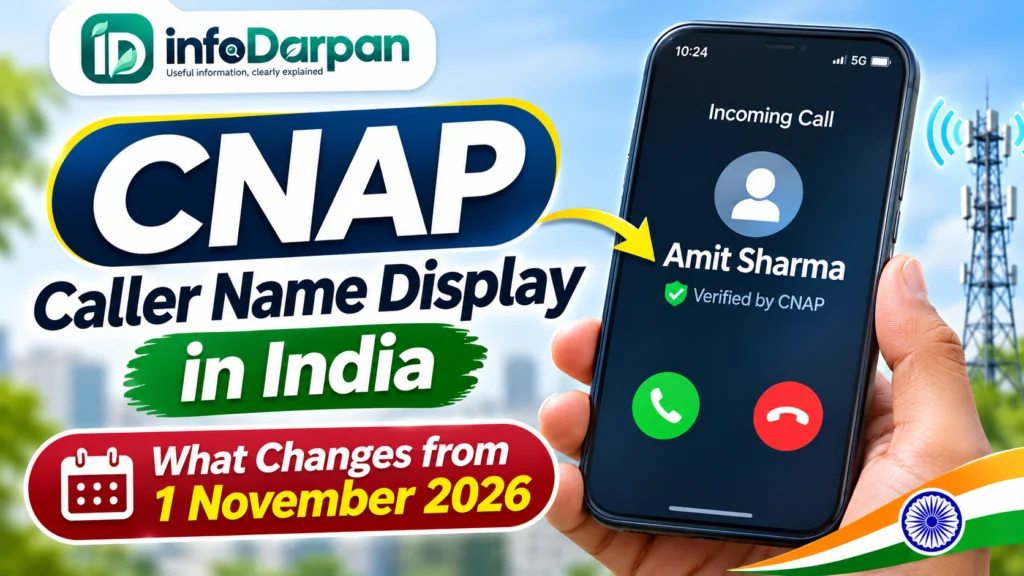
- CNAP shows the caller’s name along with the number. DoT has directed operators to provide it across their service areas from 1 November 2026, without users having to apply for it.
- The name comes from the caller’s operator records. If the number is saved in your contacts, your saved name is shown instead. International calls are labelled “International Call”.
- It covers 4G and higher networks for now. The circular says 2G, 3G and landline networks will be examined separately.
- The one exception stated in the guidelines is CLIR. Users who have activated the calling line identification restriction facility will not have their name displayed. Whether your operator offers any other opt-out is not confirmed, so ask them directly.
- If the name shown for your number is wrong, contact your operator, because it is taken from their subscriber records and operators must have a grievance process for CNAP.
- A name is not proof that a call is genuine. Never share an OTP, PIN or card details with a caller, whatever name appears.
Introduction: Your Phone Can Now Show the Caller’s Name
For years, a call from an unsaved number showed only digits. Under a DoT circular dated 13 October 2026, telecom operators have been directed to introduce Calling Name Presentation (CNAP) across their service areas from 1 November 2026. It adds the caller’s name next to the number on your call screen, even if you have not saved that number.
This guide explains what CNAP is, what you will actually see, whether you can switch it off, what to do if your own name is wrong, and why a name on the screen does not mean a call is safe.
Table of Contents
What Is CNAP?
CNAP stands for Calling Name Presentation. Today your phone shows a Calling Line Identification (CLI), which is normally just the caller’s number. Under the new guidelines the CLI shown on the recipient’s handset will have two fields: the telephone identifier, as before, and the caller’s name.
Unlike caller ID apps, CNAP is a feature of the telecom network itself. The name is looked up from the subscriber records kept by the caller’s own operator, so it is meant to be the registered name rather than a tag added by other app users.
What the DoT Circular Says
The points below are based on Business Standard’s report on the circular dated 13 October 2026 and agency reports. We could not open the circular itself, so please treat the DoT website as the final reference.
| Topic | What the guidelines say |
|---|---|
| Start date | Operators to introduce CNAP across their service areas from 1 November 2026 |
| Networks | Wireless terrestrial networks on 4G and higher. 2G, 3G and landline networks to be considered separately |
| Do users need to apply? | No. The service is provided without a separate request from the user |
| Source of the name | Subscriber data records of the originating operator |
| Saved contacts | If the number is saved on your phone, the saved name appears |
| International calls | Shown as “International Call” |
| Security | Operators must follow a security-by-design approach, and the query system must not retain the calling name after the call ends |
| Exception | Users who have activated CLIR do not have their name displayed |
| Business connections | Operators may let business or bulk users show a preferred name, subject to verification |
| Complaints | Each operator must have a mechanism to receive and resolve CNAP grievances |
What You Will See on Your Screen
- A number you have saved: your own contact name, as always.
- An unsaved domestic number: the name recorded in the caller’s operator subscriber records.
- An international call: the label “International Call”, not a name.
- A business with a preferred name: the verified trade name, if the operator has approved it.
Preferred names for businesses
Operators may let users with business or bulk connections display a preferred name instead of the name in their records. The name must be either a trademark registered in the user’s name or a trade name registered on the GST portal, and the operator must verify it. For existing connections, operators must create a way to apply for this change.
Does CNAP Work on Every Phone and Network?
Not yet. The circular covers 4G and higher-generation networks, where operators have already run trials. Some reports say operators began switching CNAP on circle by circle from late 2025 on Jio, Airtel and Vi, so you may already have seen names on some calls, and coverage can still differ between operators and areas. For 2G, 3G and landlines, DoT has said it will examine the introduction separately.
Can You Turn CNAP Off or Hide Your Name?
The guidelines state one exception: if you have activated the CLIR facility (calling line identification restriction) under the existing rules, your calling name must not be displayed. Beyond that, reports disagree. Some say operators will allow an opt-out on request, others say the CLIR route is tightly restricted in India, and a name-only opt-out through operator apps is not confirmed everywhere.
- Do not rely on the “hide caller ID” switch in your phone settings. Reports say it often has no effect on Indian networks.
- Ask your operator’s customer care or app whether CLIR or any CNAP opt-out is available for your connection.
- Remember that an opt-out only affects how your name appears to others. It does not change what you see when others call you.
What If the Name Shown Is Wrong?
Because the name comes from your operator’s subscriber records, a wrong name usually means the record itself is wrong or belongs to someone else, such as a family member who bought the SIM. The guidelines require operators to maintain a grievance mechanism for CNAP. Contact your operator’s customer care or app, ask how to correct the details linked to your number, and keep a note of your complaint number.
CNAP vs Truecaller and Other Caller ID Apps
| CNAP | Caller ID apps | |
|---|---|---|
| Where the name comes from | Operator’s subscriber records | Mostly contributions from app users and contact lists |
| Needs an app | No, it is a network feature | Yes |
| Works on | Operator calls on 4G and higher networks, for now | Depends on the app and phone |
| Spam warnings | Not part of the guidelines described above | Often included |
| Can the name be wrong? | Yes, if the operator record is wrong | Yes, if user tags are wrong |
TRAI noted in its earlier consultation on CNAP that app-based services rely on crowdsourced information that may not be reliable, which was one reason for a network-level approach.
Can CNAP Stop Scam Calls? What It Does and Does Not Do
A verified name makes it harder to hide behind a number, but it is only one signal. A name shows who the SIM is registered to. It does not show why the person is calling.
- A real name can still belong to someone running a scam, so judge the request, not the name.
- Banks, government offices and delivery companies do not ask for your OTP, PIN, CVV or UPI PIN over a call.
- If a caller creates urgency or threatens you, hang up and call the organisation back on its official number.
- Report suspected fraud on the Sanchar Saathi portal or call the national cybercrime helpline 1930.
For common scam patterns, read our guide to the Telegram task scam and our explainer on UPI payment failures.
Privacy: What the Rules Require
- Operators must use a security-by-design approach, so that the system looks up the name for the call and does not keep it after the call ends.
- Rule 48(1) of the Telecommunications (Authorisation for Provision of Principal Telecommunication Services) Rules, 2026 requires caller identification to be presented in a way that is secured against tampering.
- Users who have activated CLIR are exempt from name display.
- Business preferred names must be verified before they are shown.
What to Do Now: A Simple Checklist
- Ask a friend with a different operator to call you, and see what name appears for your number.
- If the name is wrong or belongs to someone else, contact your operator and ask how to correct the record.
- If privacy matters to you, ask your operator about CLIR or any CNAP opt-out, and do not assume the phone setting works.
- If you run a business, ask your operator whether you can register a preferred name backed by your trademark or GST trade name.
- Treat the name as a hint, never as proof, and keep your OTPs and PINs to yourself.
Common Mistakes and Myths
- Myth: CNAP blocks scam calls. Fact: it shows a registered name, and does not block or judge calls.
- Myth: you must apply to get CNAP. Fact: the guidelines say it is provided without a separate request.
- Myth: you can always switch it off in phone settings. Fact: the stated exception is CLIR, and other opt-outs are not confirmed.
- Myth: the name always shows on every call. Fact: saved contacts show your saved name, international calls show “International Call”, and 2G, 3G and landlines are not covered yet.
Final Thoughts on CNAP Caller Name Display
CNAP is a useful step because it puts a registered name on the call screen without any app. It still depends on accurate operator records, it currently covers 4G and higher networks, and it does not replace basic caution. Check how your own number appears, fix it if it is wrong, and keep treating every unexpected call that asks for money or codes as a risk.
Frequently Asked Questions
Is CNAP mandatory from 1 November 2026?
DoT has directed telecom operators to introduce it across their service areas from 1 November 2026, according to Business Standard’s report on the 13 October circular. Coverage can still differ by operator and area.
Do I need to apply or pay for CNAP?
No. The guidelines say the service is provided without a separate request from users. We found no mention of a charge in the reports we read.
Will CNAP work on 2G, 3G or landline calls?
Not yet. The circular covers 4G and higher networks, and says 2G, 3G and public switched telephone networks will be considered separately.
Can I hide my name from people I call?
Users who have activated CLIR will not have their name displayed. Reports are mixed on whether operators offer any other opt-out, so ask your operator directly.
Does the name on the screen mean the caller is genuine?
No. It shows the name in the operator’s records for that number. Never share OTPs, PINs or card details with a caller.
Sources and Official Links
- Business Standard: Govt mandates caller name display from Nov 1: Here’s what the new rules say (15 October 2026)
- IANS via MENAFN: Govt mandates caller name display service for telecom users from Nov 1
- Deccan Herald: TRAI seeks views on making caller’s name display on cellphones mandatory
- Department of Telecommunications: dot.gov.in for circulars and guidelines
- Sanchar Saathi: sancharsaathi.gov.in to report suspected fraud communication
Related Guides
Telegram task scam awareness guide | UPI payment failed: what to do | GST changes from 1 November 2026